Vulnerabilities: ask first, or fix the serious ones automatically
2 min readBy the Verploy team
Every week new vulnerabilities are published for WordPress plugins and themes. For an agency with dozens of sites, the hard part is not knowing that they exist. It is knowing which of your sites are affected, how serious it is, and fixing it without breaking anything.
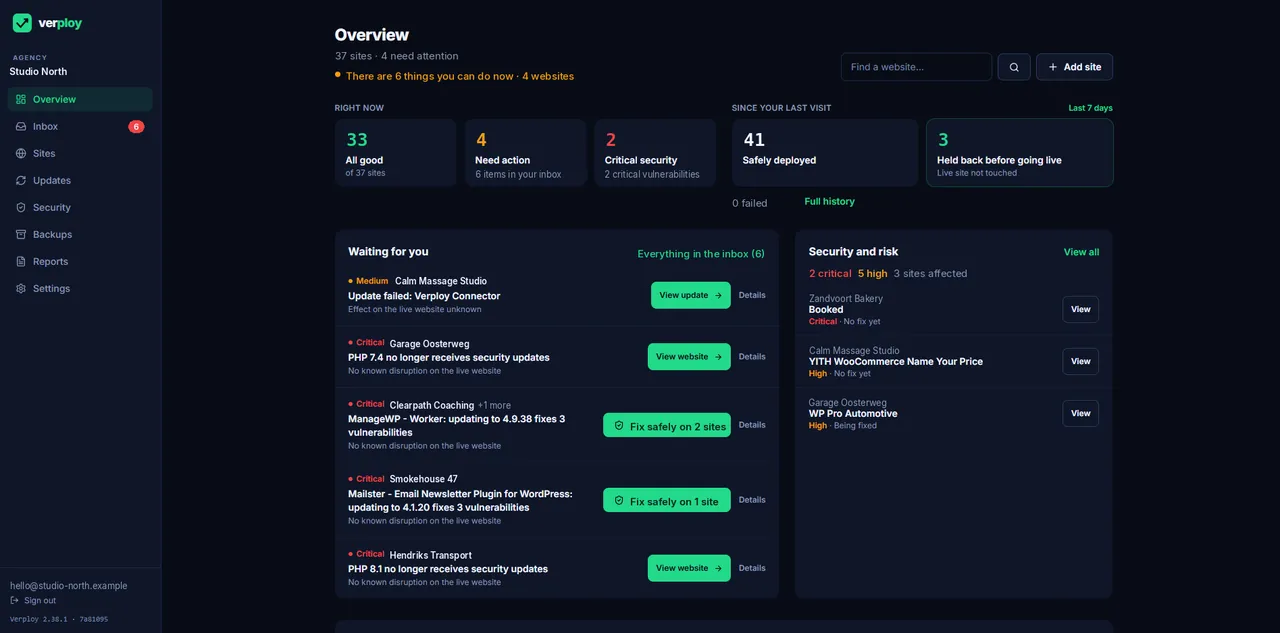
Matched against known vulnerabilities
Verploy checks every plugin and theme on every site against Wordfence vulnerability data, with a link to the source record. Findings are grouped, so one vulnerable plugin on twelve sites is one item, not twelve.
Ask first, or fix automatically
You choose the policy. By default Verploy asks first. If you prefer, Verploy fixes serious and critical vulnerabilities automatically, through the same safe update route as every other update: checked, and tested on a copy where the risk calls for it. Low and medium findings are reported, not forced.
When there is no fix yet
Sometimes a vulnerability is published before the plugin author has released a fix. Verploy then shows the site as “waiting for a fix”, keeps it on your list while it is critical, and picks up the fix as soon as it is available.
What comes next
Security checks beyond known vulnerabilities, such as file integrity checks, are on our roadmap.
Want to see it on your own sites? Start free on up to 3 sites, no credit card.